















How to turn your HeyLink.me into a client-ready profile.
If you’re a freelancer or consultant, your link in bio is more than a navigation tool. It’s your digital first impression. A well-structured HeyLink.me profile can help you attract qualified clients, increase inquiries, and turn profile visits into real business opportunities.
Here’s how to make it client-ready:
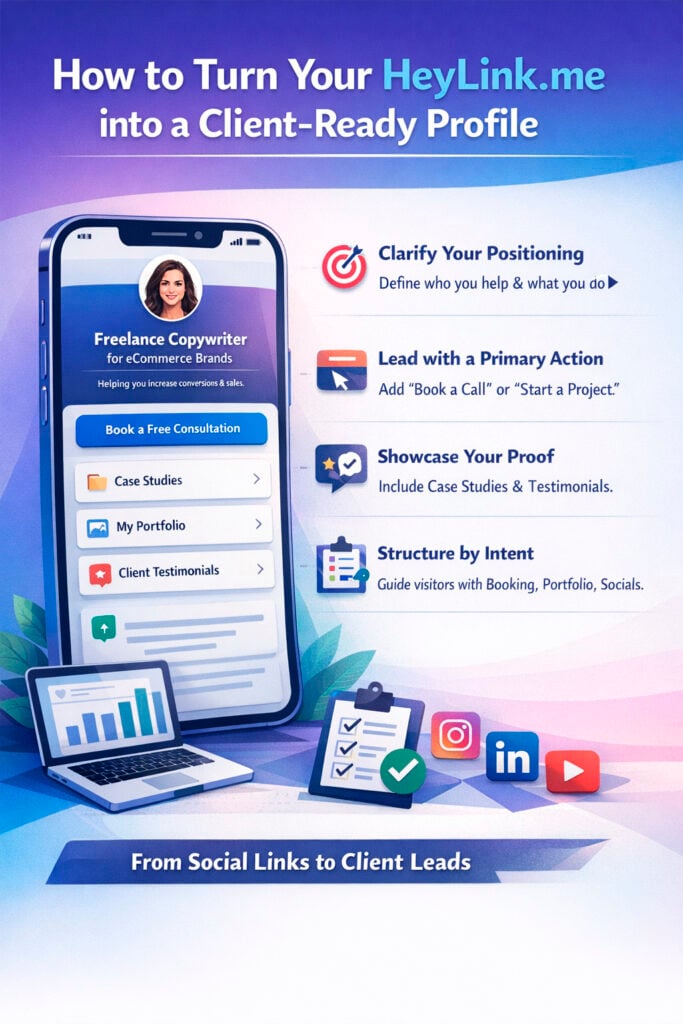
1. Define Your Positioning Clearly
Your headline should immediately explain:
- Who you help
- What you do
- What outcome you deliver
Example:
- Conversion copywriter for DTC brands
- UX designer for SaaS startups
- Paid ads specialist for e-commerce stores
Clear positioning improves trust and increases conversion rates.
Add a Strong Primary CTA
Your first button should guide visitors toward one key action:
- Book a Consultation
- Start a Project
- Request a Proposal
- Work With Me
Avoid placing social media links at the top.
Showcase Social Proof
Clients care about results.
Include:
- Case studies
- Portfolio
- Testimonials
- Key achievements
- Metrics or outcomes
Even simple credibility markers (“5+ years experience”, “30+ projects completed”) increase trust.
Organize Links Strategically
Structure your page by intent:
High intent (ready to hire):
- Booking link
- Pricing
- Project form
Medium intent (researching):
- Portfolio
- Testimonials
Low intent (just discovering):
- YouTube
This structure helps guide visitors naturally through their decision process.
Reduce Friction
A professional HeyLink.me profile should also include:
- Clear service descriptions
- Expected response time
- FAQ section
- Time zone or availability
Transparency increases conversions.
Social media builds awareness. A client-ready HeyLink.me profile turns awareness into action.
When optimized correctly, your profile becomes:
- A conversion hub;
- A client qualification tool;
- A booking system;
- A business growth asset.